In Tech Talk

  • Subscribe to our RSS feed.
  • Twitter
  • StumbleUpon
  • Reddit
  • Facebook
  • Digg

Sunday, 2 October 2011

Guide On How To Disable Automatic Reboot On System Failures

Posted on 02:55 by Unknown
How to turn off automatic reboot on system failures
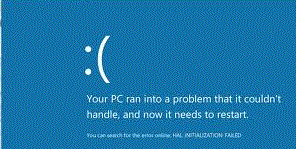
Do your computer experiencing errors or BSOD (Blue Screen Of Death) and suddenly reboot? Its because of the default configuration in your computer system that if there's an error occur your computer will reboot automatically. But there is a big problem, you dont know what the cause of the problem because the computer did not notify you the cause of the problem due to automatic system reboot. So how you gonna fix the occured error if you dont have atleast a little information of its cause. How are you gonna find for a solution or help if you dont have any information about the problem. Are you just gonna ignore it? But if you dont fix it, it will occur again and again.

Well, I will teach you how to disable the automatic rebooting of your computer. So when an error occured you will get the chance of knowing its cause. So lets disable the automatic restarting follow these steps.

Search sysdm.cpl using start menu search bar

First click "start orb" then on search bar type in "sysdm.cpl" then click on it. Take note: In some cases in window 7 and vista you'll have to open it using right click then "run it as administrator".

After that, the System Properties box will appear. Click the "Advanced" tab then in Startup and Recovery click "Settings".
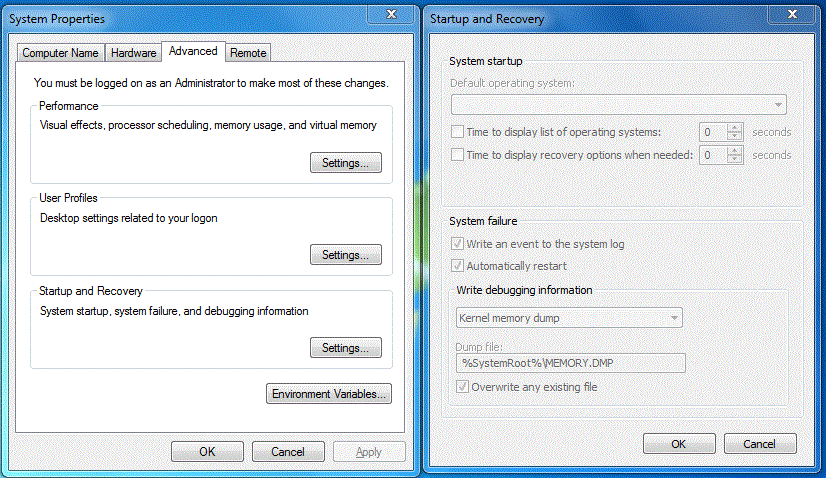
System properties advance tab and startup & recovery setting
System properties advance tab box and startup & recovery setting box

Then Startup and Recovery box will appear. In the System Failure, uncheck the box for "Automatically Restart" and then click the OK button.
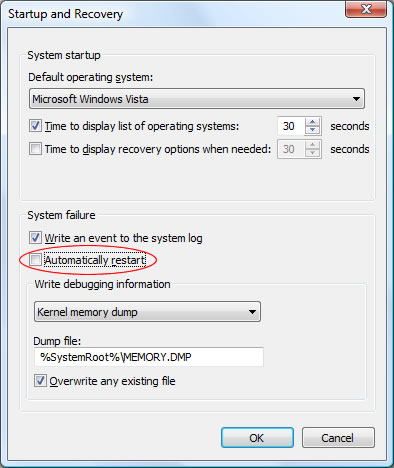
Disabling / Turning off system automatic restart on system failures

There you go, your computer now wont reboot if an error occured. You'll have the chance to fix it now.
Dont forget to Post a Comment

Have you enjoy? Please help us improve this article, We encourage you to kindly please post a comment below for your reaction, correction, question and suggestion. Thanks


Email ThisBlogThis!Share to XShare to FacebookShare to Pinterest
Posted in Computer Tips and Tricks | No comments
Newer Post Older Post Home

0 comments:

Post a Comment

Subscribe to: Post Comments (Atom)

Popular Posts

  • Ways To Know What's The Best Internet Browser Today
    As the battle between internet browsers continue, To be known as the best nor the fastest internet browser today. The top five known interne...
  • Customize Window Default User Account Picture
    Want to change the default image / picture of your computer account? Your computer has already have an image / picture for your account. Thi...
  • Guide On How To Disable Automatic Reboot On System Failures
    Do your computer experiencing errors or BSOD (Blue Screen Of Death) and suddenly reboot? Its because of the default configuration in your co...
  • New Cute Apps For Easy Update On Your Gmail & Social Networks
    In our daily lives, technology make hard task go lighter to make it easy for us. Thanks to computer technology it is now easy for us to conn...
  • Keep Your Firefox Safe While Browsing The Internet
    Browsing the internet is getting more and more dangerous as fast as the tech world evolves. Using internet to look for informations may lead...
  • How To Delete / Remove Undeletable Files
    Is there a lot of left over files remains in your computer? Uninstalling a program or software would not means that the whole files of it wo...
  • How To Revert New Facebook Chat To Previous One
    After facebook layout changes, some facebook users complain about the new interface of facebook chat sidebar. Maybe they hate it because the...
  • How To Download From SoundCloud Limitless
    SoundCloud is an audio platform that enables anyone to upload, record, promote and share their originally-created sounds across the internet...
  • Best Free Computer Software Update Checker
    All Computer Software like internet browser, media player, antivirus, etc. are keeps on upgrading and releasing a newer version for faster a...
  • Guide On How To Block A Website Without Using Software
    We all know that browsing the internet make your computer vulnerable from any malicious kind of attack. Well, I will teach you how to block ...

Categories

  • Computer Tips and Tricks

Blog Archive

  • ▼  2011 (33)
    • ▼  October (12)
      • How to Disable / Enable Auto Defragmentation at St...
      • How to Disable / Block USB Flash Drive's Autorun
      • Customize Window Default User Account Picture
      • Complete List of Keyboard Shortcut Keys in Window XP
      • How To Create Password Protected Folder Without Us...
      • How To Fix Mozilla Firefox's Addons Compatibility ...
      • How To Speed Up / Optimize Start Menu
      • How To Delete / Remove Undeletable Files
      • Recover Deleted Files In A Free Way
      • Guide On How To Disable Automatic Reboot On System...
      • How To Download From SoundCloud Limitless
      • How To Speed Up Computer's Start-Up / Shutdown
    • ►  September (17)
    • ►  August (4)
Powered by Blogger.

About Me

Unknown
View my complete profile